Digital Functional Skills pre-release materials and guidance
Our Entry Level 3 and Level 1 Digital Functional Skills assessments may require pre-release materials which must be made available to learners in advance of their assessments to support with assessment tasks.
Please read the information below to understand what you need to do around pre-release materials.
The pre-release materials should be downloaded from the 'Assessment Materials' area of the qualification pages:
- NCFE Entry Level 3 Digital Functional Skills 610/2807/1
- NCFE Level 1 Digital Functional Skills 610/2808/3
It is the centre’s responsibility to ensure that any pre-release materials are set up on the learner’s computer prior to the assessment taking place. At no point should learners set up their own pre-release materials independently without guidance and support from the centre.
For learners sitting their assessments through our remote invigilation delivery mode, we would encourage that centres follow the suggested methods below:
- learners can bring their computer equipment into the centre prior to the assessment taking place so that the pre-release materials can be set up on the computer that will be used for the assessment
- where learners are unable to come into the centre, we would encourage that centres use conferencing solutions such as Microsoft Teams, Zoom or any other screen sharing software; this will afford you the opportunity to guide them through the process of setting up the pre-release materials prior to the assessment taking place and, as previously stated, provide a beneficial teaching opportunity
What are these materials needed for?
Learners may be asked during any of their external assessments to locate and / or work with files and folders as part of their assessment. All files, folders and documents will be identifiable from the naming conventions within their assessment; until the learner accesses the assessment, they will not know which file, folder or document they may need to complete their assessment.
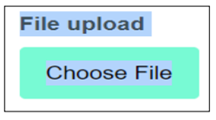
There may be occasions where the learner will need to upload the document that they have worked on into the assessment; on these occasions, this will be clearly indicated by an option to ‘Choose File’, and above that it will read ‘File upload’:

Search our full range of qualifications
Search qualificationsWhat needs to be downloaded from the NCFE website in advance of assessments?
All the materials must be downloaded and saved to your prior to the assessment taking place. They can be downloaded from the qualification pages:
- NCFE Entry Level 3 Digital Functional Skills 610/2807/1
- NCFE Level 1 Digital Functional Skills 610/2808/3
Throughout the academic session, additional pre-release materials may be added as we introduce new papers. It is vital that you check the qualification pages for updates prior to assessments.
Whether your learners are sitting their assessment online or through our remote invigilation offer, it would be best practice to use the set up of the pre-release materials as a teaching opportunity for your learners with which you provide support and guidance.
How to manage zip files
Centres must ensure that all pre-release materials are downloaded and unzipped prior to the learner sitting the assessment.
During the assessment your learners will be asked to zip their files prior to uploading them to the assessment platform. It is therefore essential that learners are familiar with how to create zip files and Centres must ensure that their learners are confident and competent in zipping files prior to sitting the assessments.
Further support is available within our demonstration functionality tool available on our qualification pages under Assessment Materials to show learners the functionality of the platform and allows them to practise zipping folders and uploading files. We have also created a how to manage zip files document. We have also created a guidance document on how to manage zip files at the bottom of the page.
Where to download them to?
The pre-release materials should be downloaded from the 'Assessment Materials' area of the qualification pages:
- NCFE Entry Level 3 Digital Functional Skills 610/2807/1
- NCFE Level 1 Digital Functional Skills 610/2808/3
You should save the files on your centre’s local network in a relevant file/folder as learners will be directed to access them during the external assessment.. The format of the materials must not be changed.
What needs to be done on completion of the assessment?
Online assessment:
Following the external assessment, you are responsible for making sure any materials saved by the learner are completely deleted from the computer used.
Prior to the assessment, learners should be advised to ensure they upload any evidence they have been asked to upload within the assessment as there is no opportunity to upload files once the test has finished
The invigilator for the assessment must check the device to ensure any completed files/folders have been deleted by learners and if not, then they must delete them.
Remote invigilation:
Learners must be instructed in advance when provided with the set-up email that they must delete any completed files/folders after ensuring they have uploaded any evidence they have been asked to upload during the assessment.
Before closing the proctoring system, it must be clear that any files and folders have been deleted, or results maybe delayed.
Are pre-release materials required for all DFSQ assessments?
Not all our Digital Functional Skills assessment papers require pre-release materials. Please ensure that the pre-release materials are downloaded as there is a possibility, that your learner will be required to interact with the pre-release materials. The need to use downloaded pre-release materials, or otherwise, will become apparent when files are referred to during the assessment.
Sample Assessments
You can access sample assessments through the qualification pages:
- NCFE Entry Level 3 Digital Functional Skills 610/2807/1
- NCFE Level 1 Digital Functional Skills 610/2808/3
Please note: The sample assessments are for demonstration purposes. Learners will not be able to upload documents and the tests will not be marked automatically. If you wish to mark responses, you will need to screenshot or record your answers to compare to the mark scheme. Answers cannot be retrieved once the assessment has been submitted.
Our sample assessments are available in-browser and are accessible using a weblink above. There is no need to schedule or use a keycode.
All content within the sample assessments is modelled on live assessments. Mark schemes for all sample papers are provided to allow centres to mark on completion. This allows you to identify learners’ strengths and weaknesses to ensure individualised skills plans can be made using the outcomes of the practice assessments.
The in-browser version of the Sample Assessment Materials is for demonstration purposes. Learners will not be able to upload documents, and the tests will not be marked automatically. If you wish to mark responses, learners will need to screenshot or record answers elsewhere to compare to the Mark Scheme. Answers cannot be retrieved once the assessment has been submitted.